この投稿はAnsible Advent Calendar 2025の20日目の記事です。
ここでは、ansible-rosaを使ってAWS環境にROSA HCPをデプロイする手順について紹介します。
ansible-rosa
Ansibleには ansible-rosa プロジェクトが存在しており、これを使用することでお試し環境のROSAを簡単にデプロイすることができます。
ちなみに、リポジトリのREADMEに書かれているとおり、これはレッドハットが公式にサポートしているものではありません。
This project is provided as-is, and is not an official or Supported Red Hat project. We will happily accept issues and Pull Requests and provide basic OSS level community support
やること
本記事では、東京リージョンにROSAをデプロイしてみます。
ansible-rosaが提供しているタスクでは、東京で有効なアベイラビリティーゾーンが選択できないため一部改修します。
必要なアカウント
- Red Hatアカウント
- AWSアカウント(ROSAが有効にできる)
動作確認環境
- RHEL 9.7
- Python 3.12
- aws-cli 2.32.21
- rosa 1.2.57
- oc 4.20.8
ROSAデプロイ
アカウント作成
もし、アカウントが存在しない場合は、それぞれのアカウントを作成してください。
必要なツールのインストール
公式手順に沿って aws コマンドをインストールします。


レッドハットのサイトから rosa と oc(kubectl) コマンドをダウンロードしてインストール(バイナリを移動)します。
それぞれのツールにパスが通っていることを確認します。
|
1 2 3 4 5 |
[root@homelab-1921681030 ~]# which aws kubectl oc /usr/local/bin/aws /usr/local/bin/kubectl /usr/local/bin/oc |
認証設定
awsコマンドで認証情報を登録します。
|
1 2 3 4 5 6 |
[root@homelab-1921681030 ~]# aws configure AWS Access Key ID [None]: <AWS_ACCESS_KEY_ID> AWS Secret Access Key [None]: <AWS_SECRET_ACCESS_KEY> Default region name [None]: ap-northeast-1 Default output format [None]: |
rosaコマンドで認証情報を登録します。
表示されたURLにアクセスして、発行したトークンを貼り付けます。
|
1 2 3 4 |
[root@homelab-1921681030 ~]# rosa login To login to your Red Hat account, get an offline access token at https://console.redhat.com/openshift/token/rosa ? Copy the token and paste it here: <TOKEN> |
以下のコマンドを実行して、結果が問題なく返ってくるか確認します。
|
1 2 3 |
[root@homelab-1921681030 ~]# aws sts get-caller-identity [root@homelab-1921681030 ~]# rosa whoami |
SSHキー作成
ROSAで使用するSSHキーを作成します。
|
1 2 3 4 |
[root@homelab-1921681030 ~]# ssh-keygen -t rsa [root@homelab-1921681030 ~]# ls ~/.ssh id_rsa id_rsa.pub |
ROSAの有効化
以下へアクセスし、ROSAを有効化します。
ROSA HCP を有効にする をクリックしてください。


以下のようにすべてのチェックが通れば問題ありません。
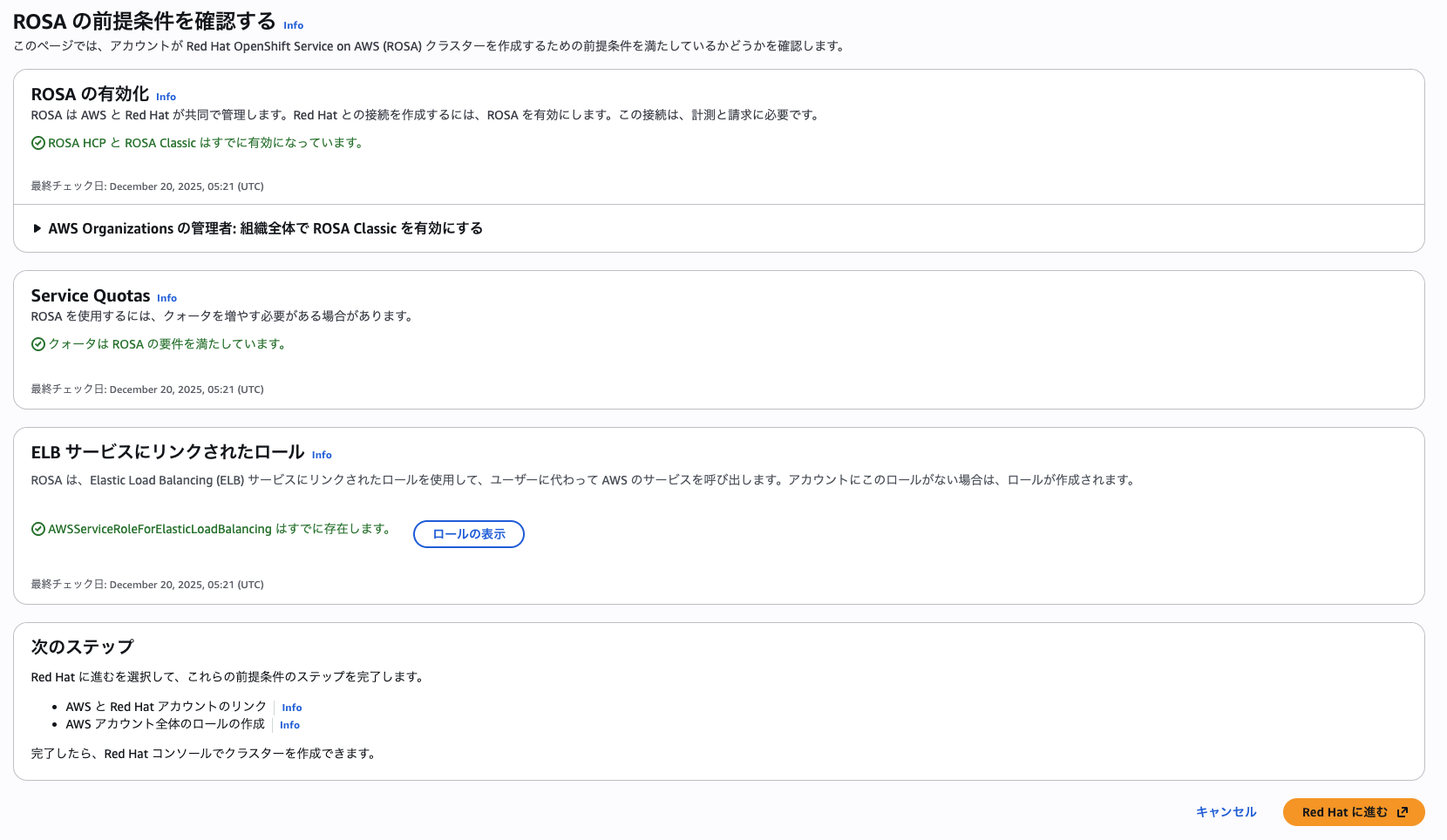
Red Hat に進む をクリックして、レッドハットアカウントに紐付けます。
Complete your account connection ページが開いたら Terms and conditions を選択して I have read and agreed to the にチェックを入れて Connect accounts をクリックします。
最終的に以下の文字列がブラウザで表示されれ問題ありません。
Congratulations, your Red Hat and AWS accounts are linked
Welcome to the Red Hat Hybrid Cloud Console. If you cannot access production tools for a subscription that you have purchased, please wait 5 minutes and and confirm your subscription at subscription inventory.
サブスクリプションの紐付けに少し時間がかかるので、作業を継続しながら待ちましょう。
ROSAデプロイ
ansible-rosaをクローンします。
|
1 2 3 |
[root@homelab-1921681030 ~]# git clone https://github.com/rh-mobb/ansible-rosa.git [root@homelab-1921681030 ~]# cd ansible-rosa/ |
デプロイ環境のセットアップをします。
|
1 2 |
[root@homelab-1921681030 ansible-rosa]# make virtualenv |
東京リージョンにデプロイするために、以下の修正を加えます。
|
1 2 3 4 5 6 7 8 9 10 11 12 13 14 15 16 17 18 19 20 21 22 23 |
diff --git a/roles/network_math/tasks/egress_vpc.yml b/roles/network_math/tasks/egress_vpc.yml index fec90c6..7557616 100644 --- a/roles/network_math/tasks/egress_vpc.yml +++ b/roles/network_math/tasks/egress_vpc.yml @@ -17,7 +17,7 @@ az: "{{ rosa_region }}a" resource_tags: { "Name":"{{ cluster_name }}-egress-public" } - cidr: "{{ rosa_egress_vpc_cidr | ansible.utils.ipsubnet(_cidr, 1) }}" - az: "{{ rosa_region }}b" + az: "{{ rosa_region }}d" resource_tags: { "Name":"{{ cluster_name }}-egress-public" } - cidr: "{{ rosa_egress_vpc_cidr | ansible.utils.ipsubnet(_cidr, 2) }}" az: "{{ rosa_region }}c" @@ -29,7 +29,7 @@ az: "{{ rosa_region }}a" resource_tags: { "Name":"{{ cluster_name }}-egress-private" } - cidr: "{{ rosa_egress_vpc_cidr | ansible.utils.ipsubnet(_cidr, 4) }}" - az: "{{ rosa_region }}b" + az: "{{ rosa_region }}d" resource_tags: { "Name":"{{ cluster_name }}-egress-private" } - cidr: "{{ rosa_egress_vpc_cidr | ansible.utils.ipsubnet(_cidr, 5) }}" az: "{{ rosa_region }}c" |
|
1 2 3 4 5 6 7 8 9 10 11 12 13 14 15 16 17 18 19 20 21 22 23 |
diff --git a/roles/network_math/tasks/rosa_vpc.yml b/roles/network_math/tasks/rosa_vpc.yml index ef387a4..0be16b4 100644 --- a/roles/network_math/tasks/rosa_vpc.yml +++ b/roles/network_math/tasks/rosa_vpc.yml @@ -7,7 +7,7 @@ - cidr: "{{ rosa_vpc_cidr | ansible.utils.ipsubnet(_cidr, 0) }}" az: "{{ rosa_region }}a" - cidr: "{{ rosa_vpc_cidr | ansible.utils.ipsubnet(_cidr, 1) }}" - az: "{{ rosa_region }}b" + az: "{{ rosa_region }}d" - cidr: "{{ rosa_vpc_cidr | ansible.utils.ipsubnet(_cidr, 2) }}" az: "{{ rosa_region }}c" when: rosa_vpc_public_subnets is not defined @@ -16,7 +16,7 @@ - cidr: "{{ rosa_vpc_cidr | ansible.utils.ipsubnet(_cidr, 3) }}" az: "{{ rosa_region }}a" - cidr: "{{ rosa_vpc_cidr | ansible.utils.ipsubnet(_cidr, 4) }}" - az: "{{ rosa_region }}b" + az: "{{ rosa_region }}d" - cidr: "{{ rosa_vpc_cidr | ansible.utils.ipsubnet(_cidr, 5) }}" az: "{{ rosa_region }}c" when: rosa_vpc_private_subnets is not defined |
HCPのグループ変数(environment/hcp/group_vars/all.yaml)を修正します。
|
1 2 3 4 5 6 7 8 9 10 11 12 13 14 15 16 |
diff --git a/environment/hcp/group_vars/all.yaml b/environment/hcp/group_vars/all.yaml index eea231b..e80c417 100644 --- a/environment/hcp/group_vars/all.yaml +++ b/environment/hcp/group_vars/all.yaml @@ -10,8 +10,10 @@ rosa_sts: true rosa_hosted_cp: true # uncomment to pin to a version # rosa_version: 4.14.6 +rosa_version: 4.20.8 -rosa_region: us-east-1 +rosa_region: ap-northeast-1 +# rosa_region: us-east-1 rosa_vpc_cidr: "10.0.0.0/20" rosa_compute_machine_type: m5.xlarge |
後はデプロイコマンドを実行して待つだけです。
|
1 2 |
[root@homelab-1921681030 ansible-rosa]# make create.hcp |
問題なくデプロイできれば、以下のように出力されます。
|
1 2 3 4 5 6 7 8 9 10 11 12 13 14 15 16 17 18 |
TASK [roles/finish : debug] ********************************************************************************************************************************************************************************************************** task path: /root/ansible-rosa/roles/finish/tasks/main.yml:39 ok: [localhost] => msg: |- Cluster API: https://api.xxx.openshiftapps.com:443 Cluster Console: https://console-openshift-console.xxx.openshiftapps.com Authenticate to cluster: oc login https://api.xxx.openshiftapps.com:443 \ --username xxx --password "xxx" TASK [roles/finish : debug] ********************************************************************************************************************************************************************************************************** task path: /root/ansible-rosa/roles/finish/tasks/main.yml:49 ok: [localhost] => msg: |- Cluster API: https://api.xxx.openshiftapps.com:443 Cluster Console: https://console-openshift-console.xxx.openshiftapps.com |
表示されたアドレスにアクセスしてログインできます 🙂


